Best Indoor Security Cameras for Monitoring Pets and Elderly Parents

Compare five indoor security cameras for checking on pets and elderly parents, with guidance on video, alerts, storage, privacy, and room coverage.
As an Amazon Associate I earn from qualifying purchases.
A camera in the living room can answer a quick question without a phone call: Is the dog settled, did an older parent get up safely, or is there an unexpected movement at home? The right model depends less on having the highest resolution and more on how you plan to monitor, record, and respond.
This list includes simple fixed cameras, pan-and-tilt models, a wired recorder-based system, and a high-resolution multi-camera kit. The recommendations use the supplied product information; features, app behavior, storage requirements, and subscription terms should be verified before purchase.
Quick comparison
| Camera | Best for | Standout approach | Main tradeoff to consider |
|---|---|---|---|
| Tapo C100 4-Pack | Several rooms on a budget-conscious setup | 1080p video, alerts, local microSD recording | Fixed view and 2.4GHz Wi-Fi |
| Tapo C211 2-Pack | Following activity around a room | 2K pan-and-tilt coverage | MicroSD card is separate; 2.4GHz Wi-Fi |
| Reolink RLK8-520D4-5MP | Continuous, centralized recording | Four PoE cameras with NVR storage | More installation and equipment than a single indoor camera |
| Ring Indoor Cam | Alexa-centered monitoring and privacy control | 1080p video, Color Night Vision, manual privacy cover | Some recording and advanced features require a subscription |
| Anona 4K 4-Pack | Wide coverage and detailed video | Pan-tilt, 4K, tracking, and dual-band Wi-Fi | Higher resolution can mean greater storage and network demands |
What to look for in a camera for pets or older adults
Alerts that reduce unnecessary checking
Motion notifications are useful, but a pet can trigger plenty of them. Person, animal, or crying detection may help narrow alerts, although no automated detection should be treated as a guaranteed safety system. Before buying, check which alerts are included without a subscription and whether detection settings are available in the app.
Coverage and placement
A fixed camera can work well when aimed at a crate, couch, doorway, or favorite chair. Pan-and-tilt is more flexible for a large room, but it still needs a clear view and a stable power connection. For an older parent, place the camera where it observes common areas without intruding on bathrooms, bedrooms, or private conversations.
Storage, connectivity, and privacy
- Confirm whether recordings can be saved locally, in the cloud, or both.
- Check the maximum supported microSD capacity and whether the card is included.
- Verify Wi-Fi band requirements. Some models use 2.4GHz, while others support both 2.4GHz and 5GHz.
- Look for a physical privacy control, a microphone switch, or a way to disable recording when family members want privacy.
- Use a strong, unique account password and enable available account-security features.
The best indoor security cameras for pets and elderly parents
1. Tapo C100 4-Pack: Best for monitoring multiple rooms
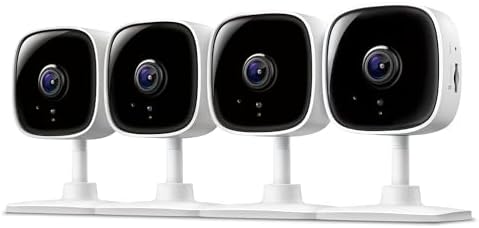
The Tapo C100 4-Pack is a practical choice for covering several indoor locations at once. Each camera provides 1080p video, two-way audio, infrared night vision, and motion, person, and baby-crying detection according to the supplied product information. That combination suits a home where you want one view near a pet’s resting area, another in a hallway, and additional coverage in shared rooms.
Local recording to a separately purchased microSD card can provide a no-subscription storage option, with support listed up to 512GB. The cameras connect over 2.4GHz Wi-Fi and work with Alexa and Google Assistant for viewing on compatible screens. The key tradeoff is that these are fixed-view cameras, so they cannot follow a pet or scan a room after movement. Verify card compatibility, app permissions, and the exact alert options before installing.
2. Tapo C211 2-Pack: Best for pan-and-tilt room coverage

The Tapo C211 2-Pack is a stronger fit when a dog, cat, or family member moves around a broad room. It records in 2K and offers a stated 360-degree horizontal and 114-degree vertical pan-and-tilt range. That movement can reduce the need to buy a separate camera for every angle, provided the camera is positioned where its view is not blocked.
Motion, person, and baby-crying notifications are listed, along with local recording on a microSD card up to 512GB or optional cloud storage. The product uses 2.4GHz Wi-Fi and supports Alexa and Google Assistant. The tradeoffs are the separate storage card and the need to confirm compatibility before purchase. Also verify how the app handles pan-and-tilt control, notification sensitivity, and any cloud-only features.
3. Reolink RLK8-520D4-5MP: Best for a dedicated wired recording system

The Reolink RLK8-520D4-5MP takes a different approach from app-first indoor cameras. It includes four 5MP PoE cameras and an NVR with a pre-installed 2TB hard drive. The supplied details list person, animal, and vehicle detection, 100-foot night vision, built-in microphones, and motion, scheduled, or continuous recording.
This setup is best for homeowners who want centralized recording and are comfortable routing network cables and placing an NVR. It can also make sense for monitoring multiple areas where dependable wired connections are more important than a compact tabletop design. It is less convenient for renters or anyone seeking a quick, single-room pet camera. The listed system is described for indoor and outdoor surveillance, so verify camera placement, cable paths, local network requirements, and whether the supplied camera mix suits your indoor layout.
4. Ring Indoor Cam: Best for Alexa users who want a physical privacy cover
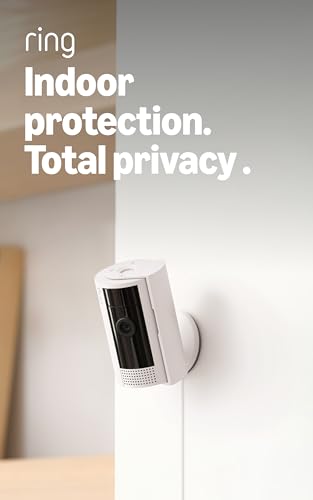
Ring Indoor Cam is a straightforward option for households already centered on Alexa. The supplied information lists 1080p video, Live View, Color Night Vision, motion alerts, customizable motion coverage, and Alexa integration. Advanced Pre-Roll is described as capturing extra seconds before a motion event, while compatible Ring Protect features provide additional recording and alert capabilities through a subscription sold separately.
Its most notable privacy feature is a manual cover that turns off the camera and microphone when rotated into place. The plug-in design can sit on a table or use the flexible swivel mount. This may work well for checking a pet or shared living area, but buyers should verify which recordings, AI-powered alerts, and playback features require Ring Protect. Also consider whether the household is comfortable with a cloud-oriented ecosystem.
5. Anona 4K 4-Pack: Best for wide, detailed coverage
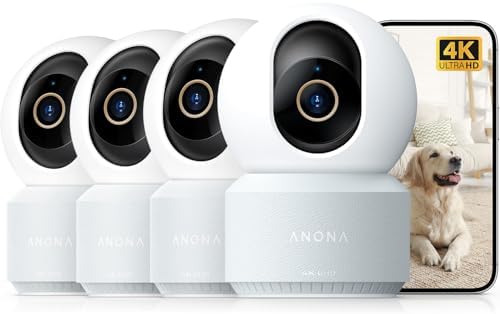
The Anona 4K 4-Pack is aimed at shoppers who want broad coverage and high-resolution video across several rooms. The supplied specifications list 4K video, 8x digital zoom, 355-degree pan, 110-degree tilt, auto-tracking, and person, pet, and baby-crying detection. Dual-band 2.4GHz and 5GHz Wi-Fi 6 support is also listed, which may provide more flexibility on a compatible home network.
Local recording supports a separately purchased microSD card up to 512GB per the supplied information, with an optional cloud service also described. Two-way audio and a privacy mode are listed. The tradeoff is that 4K video and multiple moving cameras may demand more storage and network capacity than a basic 1080p setup. Verify the exact privacy-mode behavior, app permissions, card requirements, and whether your Wi-Fi environment supports the desired band.
How to choose the right setup
Choose the Tapo C100 if you need simple fixed views in multiple rooms. Choose the Tapo C211 if pan-and-tilt coverage matters more than having four cameras. The Reolink system is the better match for a more permanent, wired installation with an NVR. Ring is appealing for Alexa households that value a physical privacy cover. Anona is the most feature-heavy choice in this selection for shoppers prioritizing 4K detail, pan-and-tilt coverage, and dual-band connectivity.
For monitoring an older parent, treat any camera as a communication and awareness tool—not a replacement for agreed check-ins, medical equipment, or emergency services. Discuss placement and recording with everyone who lives in or regularly visits the home. A camera should preserve dignity as well as provide useful visibility.
FAQ
Do indoor cameras need a subscription?
Not always. The supplied Tapo and Anona information describes local microSD recording, while Ring lists additional recording and advanced features through a separate Ring Protect subscription. Confirm current terms before buying.
Is pan-and-tilt useful for pet monitoring?
It can help cover more of a room and follow activity, but it does not guarantee that a moving pet will remain visible. Placement, lighting, notification settings, and the camera’s detection behavior still matter.
Should I use a camera to check on an elderly parent?
Use one only with appropriate consent and clear expectations. Place it in an agreed shared area, explain who can access it, and avoid private spaces. It should supplement—not replace—human check-ins and dedicated safety services.
 ✓