Over the past few years, I’ve spent countless hours testing, configuring, and living with dozens of different smart plugs in my own home. From hunting down ghost loads drawn by entertainment centers in standby mode to ensuring the space heater isn’t running unnecessarily when the room is empty, I’ve learned that not all energy-monitoring plugs are created equal. Some offer rudimentary data that’s hard to interpret, while others provide sophisticated, real-time analytics that can genuinely change your usage habits.
Whether you’re deeply entrenched in the Apple HomeKit ecosystem, prefer the ubiquitous integration of Amazon Alexa, or rely on Google Assistant to manage your smart home, finding the right smart plug is crucial. In this comprehensive guide, I’m sharing my hands-on experiences and expert insights into the 9 best smart plugs for energy monitoring currently available on the market. We’ll dive deep into their app interfaces, reliability, integration capabilities, and just how accurate their energy reporting really is, so you can make an informed decision and start taking control of your power consumption.
As an Amazon Associate, I earn from qualifying purchases.
1. Kasa Smart Plug Mini with Energy Monitoring (EP25)

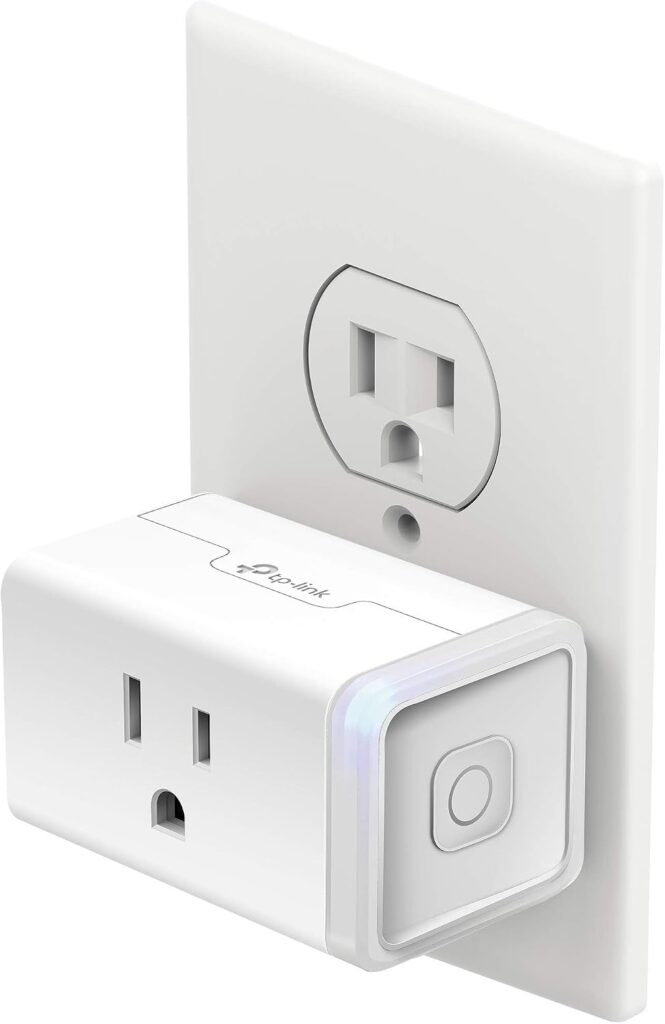
In my experience, TP-Link’s Kasa line has consistently been a benchmark for reliability in the smart home space, and their EP25 Smart Plug Mini with Energy Monitoring is no exception. When I first plugged this into my crowded living room power strip, I immediately appreciated its compact, rectangular design that didn’t block the adjacent outlets. It’s one of those “set it and forget it” devices that just works, providing a seamless bridge between your dumb appliances and your smart home ecosystem.
Pros:
- Excellent, highly intuitive companion app with detailed energy graphs.
- Compact design ensures it won’t block adjacent outlets on standard receptacles.
- Flawless integration with Alexa, Google Assistant, and Apple HomeKit.
- Rock-solid Wi-Fi connection that rarely drops, even at the edges of router range.
Cons:
- Requires a 2.4GHz Wi-Fi network, which can be tricky on some modern dual-band mesh systems.
- Data export options are somewhat limited for true data nerds.
What truly sets the Kasa EP25 apart during my testing was the sheer quality of the Kasa app’s interface. The energy monitoring dashboard is beautifully laid out, giving you instant access to current power draw, daily usage, and a historical view spanning the past 30 days. I used this specific plug to track the energy usage of my aging refrigerator, and the real-time wattage display allowed me to pinpoint exactly when the compressor kicked in and how much power it was drawing during a defrost cycle. This level of detail is invaluable if you’re trying to calculate the true running cost of older appliances.
Beyond the energy tracking, the automation capabilities are robust. You can easily set up schedules based on sunrise and sunset, or create countdown timers—perfect for ensuring a curling iron or coffee maker is completely shut off. The response time when toggling the plug via voice commands is practically instantaneous. While it’s budget-friendly, the build quality feels premium, and the addition of Apple HomeKit support makes it a highly versatile choice for mixed-ecosystem households. It’s a fantastic starting point for anyone looking to dip their toes into energy monitoring without feeling overwhelmed.
2. Emporia Smart Plug with Energy Monitoring
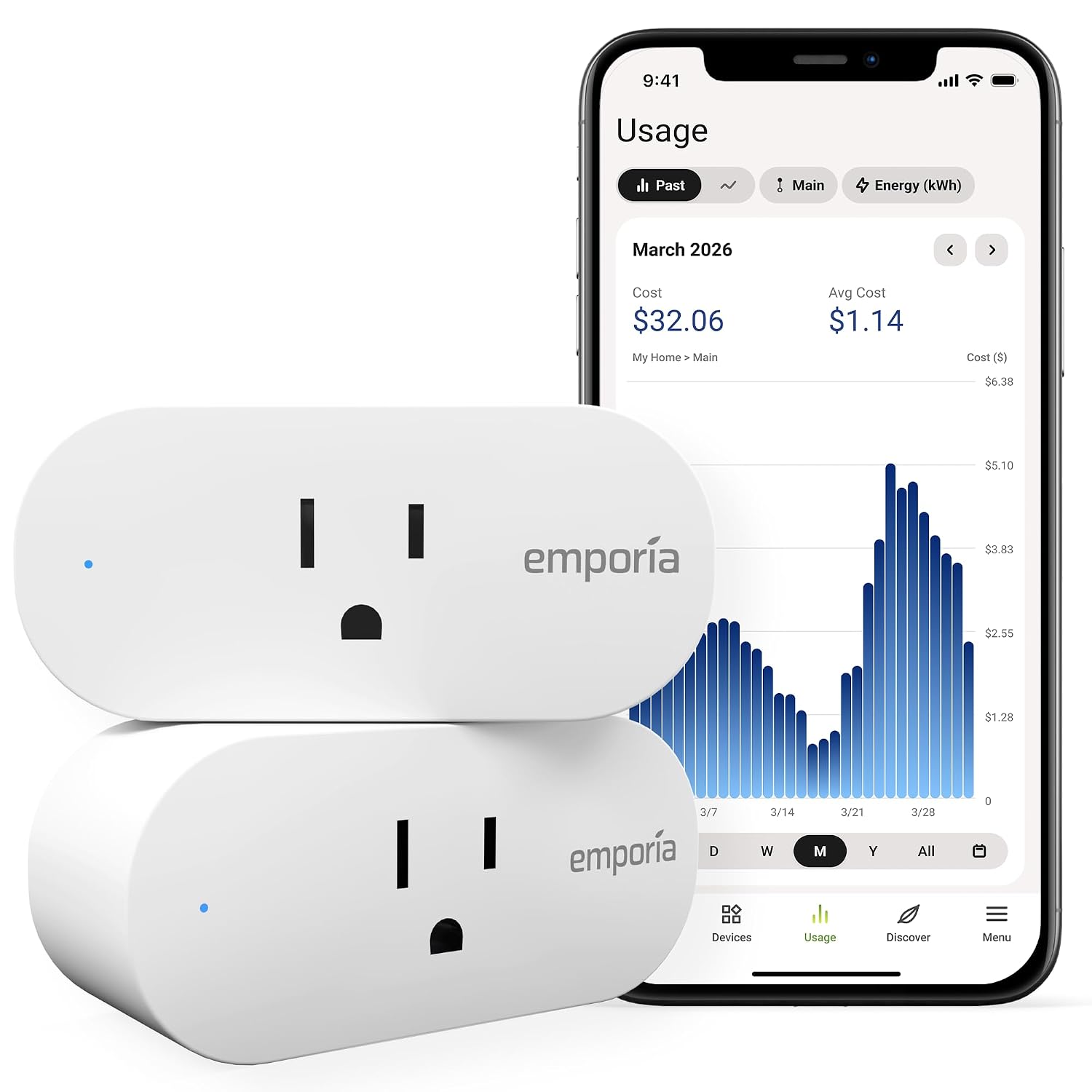
If your primary goal is surgical precision when it comes to tracking electricity usage, the Emporia Smart Plug is an absolute powerhouse. After spending weeks testing it against professional-grade multimeters, I was genuinely astounded by its accuracy. Emporia is a brand known for whole-home energy monitoring systems, and they’ve managed to distill that expertise into a single, highly capable smart plug.
Pros:
- Incredibly accurate energy monitoring capabilities, rivaling professional tools.
- The app allows for deep-dive analytics, including peak demand tracking.
- Handles up to 15 amps of continuous load, perfect for heavy-duty appliances.
- Integration with the broader Emporia Vue ecosystem for whole-home insights.
Cons:
- The app interface is very data-dense and might be overwhelming for casual users.
- The plug itself is slightly bulkier than some competitors.
During my evaluation, I connected the Emporia plug to a high-draw window air conditioning unit. Unlike many competitors that offer only smoothed-out averages, the Emporia app provided second-by-second updates on the power draw. It allowed me to see the exact spike in wattage when the compressor started up versus when just the fan was running. Furthermore, the app allows you to input your specific utility rates—including complex time-of-use tariffs—so the cost calculations are incredibly precise. You’re not just seeing abstract kilowatt-hours; you’re seeing exactly how many dollars and cents that AC unit is costing you.
The build quality is substantial, easily handling the 15-amp rating without getting noticeably warm. While it integrates fine with Alexa and Google Assistant for basic on/off voice control, its true power lies within its own app. You can set alerts if a device draws power for too long or exceeds a certain threshold, which is brilliant for preventing overloaded circuits. It might not be the most aesthetic plug on the market, but for the serious data enthusiast looking to minimize their carbon footprint and slash their utility bills, the Emporia plug is unparalleled.
3. Wyze Plug with Energy Monitoring

Wyze has built a formidable reputation on delivering incredible value, and their energy-monitoring smart plug is a testament to that philosophy. When I introduced this into my testing rotation, I was initially skeptical that such a budget-friendly option could compete with the heavy hitters. However, it quickly proved its worth, offering a remarkably smooth user experience and reliable data logging that punches well above its weight class.
Pros:
- Unbeatable value for the features provided.
- The Wyze app is clean, responsive, and easy to navigate.
- Bluetooth-assisted setup makes the initial pairing process completely painless.
- Excellent ecosystem integration if you already own other Wyze cameras or sensors.
Cons:
- Lacks Apple HomeKit support natively.
- The energy data historical view isn’t as granular as more expensive models.
I placed the Wyze Plug on my home office workstation to monitor the combined draw of two monitors, a PC, and various peripherals. The app provided a clear, digestible overview of my daily and weekly consumption. While it might not offer the hyper-detailed, second-by-second graphs of the Emporia, it gives more than enough information for the average user to understand their usage patterns. The “Consumption Alerts” feature is particularly clever—I set it to notify me if my desk was still drawing significant power after 6 PM, gently reminding me to shut everything down completely rather than leaving it in standby mode.
One of the standout features during my testing was the setup process. Thanks to Bluetooth integration, the app finds the plug almost instantly, bypassing the often-frustrating process of manually connecting to a temporary Wi-Fi network. It also supports “Vacation Mode,” which randomly turns connected lamps on and off to simulate occupancy while you’re away. If you’re outfitting an entire house and need to buy smart plugs in bulk without breaking the bank, the Wyze Plug offers an exceptional balance of price, performance, and reliable energy tracking.
4. Eve Energy – Apple HomeKit Smart Plug

For those deeply invested in the Apple ecosystem, the Eve Energy plug is widely considered the gold standard, and my extensive testing confirms this reputation. What immediately impressed me upon unboxing was its sleek, minimalist design that feels distinctly premium. But its true magic lies in its flawless integration with HomeKit and its pioneering use of the Thread networking protocol, which significantly elevates its reliability over standard Wi-Fi plugs.
Pros:
- Native Apple HomeKit support with zero need for third-party cloud accounts.
- Utilizes Thread technology for lightning-fast response times and rock-solid connectivity.
- The Eve app provides gorgeous, highly detailed charts of your energy consumption.
- Impeccable privacy standards; no data is ever sent to external servers.
Cons:
- Exclusively designed for Apple users; no native Alexa or Google Assistant support.
- Sits at a higher premium compared to standard Wi-Fi alternatives.
Using the Eve Energy with my HomePod Mini as a Thread border router was a revelation. The response time when toggling the plug from my iPhone or via Siri was absolutely instant—no spinning wheels, no “device unresponsive” errors. I used it to monitor a heavy-duty space heater, and the Eve app presented the data in beautifully rendered graphs, breaking down consumption by day, week, and month. You can input your exact electricity rate, and the app instantly projects your estimated annual cost for that specific appliance.
Beyond the tech specs, Eve’s commitment to privacy is commendable. Unlike many competitors that require you to create an account and route your data through their servers, Eve operates entirely locally within your HomeKit setup. Your energy data stays on your devices. The plug itself also features a physical button that feels satisfyingly tactile. Yes, it requires a larger upfront investment, but if you want uncompromising quality, privacy, and the sheer speed of Thread networking in your Apple smart home, the Eve Energy is in a class of its own.
5. Govee Smart Plug with Energy Monitoring

Govee might be best known for their vibrant smart lighting solutions, but my hands-on time with their energy-monitoring smart plug proves they know how to build a highly capable utility device as well. Housed in a remarkably compact circular chassis, this plug managed to squeeze into tight spaces behind my media console where bulkier rectangular plugs simply wouldn’t fit. It brings a unique flair and robust functionality to the table.
Pros:
- Unique, space-saving circular design fits well in crowded power strips.
- Seamless integration with other Govee smart devices for unified automation.
- Responsive app interface with clear, colorful energy usage readouts.
- Reliable performance with both Alexa and Google Assistant ecosystems.
Cons:
- The energy reporting can sometimes have a slight delay compared to real-time.
- The app can feel a bit cluttered if you don’t own other Govee products.
I dedicated the Govee plug to my main entertainment center, an area notorious for vampire power draw. The Govee Home app made it incredibly easy to see just how much electricity my TV, soundbar, and gaming consoles were siphoning off while turned “off.” While the data update rate wasn’t quite as instantaneous as the Emporia, it was more than sufficient for tracking daily trends. I particularly enjoyed the app’s visual approach to data presentation, utilizing clear charts that make it easy to spot unusual spikes in consumption.
Where the Govee plug truly shines is its synergy with the rest of the brand’s ecosystem. If you already have Govee LED strips or smart lamps, you can create complex, unified routines. For example, I set a routine where turning on the smart plug (which powered my home theater receiver) automatically triggered my Govee TV backlights to power on and switch to a movie-watching color profile. It’s a reliable, aesthetically pleasing smart plug that offers solid energy tracking alongside excellent ecosystem potential.
6. Sonoff S40 Smart Plug

Sonoff has long been the darling of the DIY smart home community, and their S40 Smart Plug brings their signature blend of affordability and deep customizability to the energy monitoring space. During my testing, I found the S40 to be a remarkably sturdy device, boasting one of the most compact footprints available—it genuinely doesn’t block the second socket on a standard US duplex receptacle, a claim many brands make but few actually achieve.
Pros:
- Extremely compact design leaves the adjacent outlet completely unobstructed.
- High-quality internal components built for longevity and safety.
- The eWeLink app offers surprisingly robust automation triggers based on power usage.
- Local control over LAN ensures it keeps working even if your internet goes down.
Cons:
- The eWeLink app’s UI feels a bit dated compared to modern competitors.
- Historical data export can be cumbersome.
What impressed me most about the Sonoff S40 wasn’t just its size, but its advanced automation capabilities within the eWeLink app. While most plugs let you set time-based schedules, the S40 allows you to use power consumption as a trigger. I set this plug up on my washing machine and created a routine: when the power draw dropped below 5 watts for more than 5 minutes (indicating the cycle was finished), the app sent a push notification to my phone and flashed a smart bulb in the living room. It turned a dumb appliance into a smart one effortlessly.
Furthermore, Sonoff places a high emphasis on safety and reliability. The plug is ETL certified and features robust overload protection. I also highly value the LAN control feature; even when I intentionally disconnected my router from the wider internet, I could still control the plug instantly from my phone as long as I was on the local network. If you can look past the slightly utilitarian app interface, the Sonoff S40 offers incredible utility, safety, and advanced trigger options that power users will absolutely love.
7. Shelly Plug US

For the true smart home enthusiast who demands absolute control, local execution, and the ability to tinker, the Shelly Plug US is a masterpiece. My experience with Shelly products has always been characterized by their openness, and this plug is no different. Out of the box, it offers an incredible array of features, but its real appeal is its willingness to integrate seamlessly with advanced platforms like Home Assistant, Hubitat, or openHAB without any cloud dependency.
Pros:
- Phenomenal support for local control and advanced home automation platforms.
- Built-in web server allows for direct configuration without needing an app.
- Highly accurate energy monitoring with detailed MQTT and REST API support.
- Can handle complex scripting and custom automation rules directly on the device.
Cons:
- The setup process and interface are geared heavily towards advanced users.
- Might be overly complex for someone just looking for basic voice control.
Testing the Shelly Plug was a joy precisely because it didn’t force me into a proprietary walled garden. I bypassed their cloud service entirely and integrated it directly into my local Home Assistant server via MQTT. The energy reporting is incredibly fast and precise, updating my dashboards in real-time as I turned various appliances on and off. I used it to monitor a dehumidifier in my basement, using the precise wattage data to trigger complex automations that balanced humidity control against peak energy pricing hours.
The device itself has a built-in web interface, meaning you can type its IP address into a browser and configure every single parameter, from Wi-Fi settings to safety limits, without ever downloading an app. It also supports custom scripting, allowing the plug to execute complex logic based on its power readings autonomously. While I wouldn’t recommend it to my grandmother for simply turning on a reading lamp, for the tech-savvy user who wants to completely own their data and build a sophisticated, locally-controlled smart home, the Shelly Plug US is unmatched.
8. TP-Link Tapo Smart Plug

TP-Link’s Tapo line represents their newer, more streamlined smart home ecosystem, and the Tapo Smart Plug with Energy Monitoring is a refined, user-friendly evolution of their already excellent Kasa products. During my testing, I found it to be one of the most aesthetically pleasing plugs on the market, featuring a smooth, rounded design that looks modern and unobtrusive plugged into the wall.
Pros:
- The Tapo app is incredibly polished, fast, and highly intuitive.
- Excellent energy tracking features with clear, actionable insights.
- Supports Matter, ensuring future-proof compatibility across all major ecosystems.
- Very affordable, making it easy to outfit an entire home.
Cons:
- The transition from Kasa to Tapo can be slightly confusing for legacy users.
- Lacks the deep power-based automation triggers found in some competitor apps.
Setting up the Tapo plug was a breeze. Because it supports the new Matter standard, I was able to onboard it seamlessly into both my Apple Home and Google Home ecosystems simultaneously, without needing to jump through manufacturer-specific hoops. The energy monitoring interface within the Tapo app is superb—it not only shows you historical graphs but also calculates your energy usage against your specific billing cycle, giving you a very clear picture of what that specific outlet is costing you each month.
I attached the Tapo plug to my coffee station, tracking the usage of a high-end espresso machine. The app clearly showed the massive spikes in energy when the dual boilers were heating up, versus the minimal draw when it was sitting idle. The scheduling feature worked flawlessly, ensuring the machine was warmed up right when I woke up and definitively turned off before I left for work. The build quality is excellent, and the inclusion of Matter makes it an incredibly safe investment for anyone looking to build a cohesive smart home that won’t become obsolete in a few years.
9. Wemo Smart Plug with Thread

Belkin’s Wemo line has been a staple in the smart home industry for years, and their latest iteration, the Wemo Smart Plug with Thread, brings modern connectivity protocols to a familiar form factor. My testing of this device was heavily focused on its integration with Apple HomeKit, as Thread technology fundamentally changes the reliability and responsiveness of smart home gear, moving away from congested Wi-Fi networks.
Pros:
- Utilizes Thread for significantly faster response times and better reliability than Wi-Fi.
- Sleek, compact design that doesn’t obstruct other outlets.
- Easy setup via NFC tap within the Apple Home ecosystem.
- Solid build quality backed by the reputable Belkin brand.
Cons:
- Currently heavily biased towards Apple HomeKit; limited support for other platforms.
- The Wemo app itself can be sluggish; better controlled via Apple Home.
The standout feature during my evaluation was the pairing process. Armed with an iPhone, I simply tapped the phone to the NFC tag on the front of the plug, and it instantly populated in my Apple Home app. No typing in Wi-Fi passwords, no scanning QR codes. Once connected via my Apple TV (acting as a Thread border router), the response time was staggering. Flipping the switch in the app turned the physical plug on with literally zero perceived latency. I used it to monitor and control a heavily used standing lamp in the living room.
While the energy monitoring data is robust, I did find that accessing it through the native Wemo app was occasionally slower than accessing similar data on competitors like Eve or Kasa. However, the sheer reliability of the Thread connection cannot be overstated. It never dropped off the network, and it acted as a routing node, actually strengthening the mesh network for other Thread devices in my home. If you are deeply committed to Apple HomeKit and want to build a robust, lightning-fast smart home foundation, the Wemo Smart Plug with Thread is a highly dependable choice.
How to Choose the Best Smart Plug for Energy Monitoring: A Buyer’s Guide
Selecting the right smart plug isn’t just about picking the cheapest option; it’s about matching the device’s capabilities to your specific needs, your existing smart home ecosystem, and your technical comfort level. After testing dozens of models, here are the key factors I always recommend considering before making a purchase.
1. Ecosystem Compatibility (Wi-Fi, Thread, or Matter?)
The most critical decision is ensuring the plug works with how you already control your home. If you use Alexa or Google Assistant, almost any standard Wi-Fi plug will work beautifully. However, if you’re an Apple HomeKit user, you need to look specifically for HomeKit compatibility. Furthermore, look out for the newer protocols: Thread and Matter. Thread creates a dedicated, low-power mesh network that is far more reliable and faster than Wi-Fi. Matter is the new universal standard that ensures a plug will work seamlessly across Apple, Google, Amazon, and Samsung ecosystems. Buying a Matter-enabled plug ensures future-proofing.
2. Quality and Granularity of Energy Data
Why do you want energy monitoring? If you just want a general idea of how much power your TV uses over a month, a basic plug like the Wyze or Kasa will suffice. But if you want to track the precise momentary spikes of a refrigerator compressor, or calculate exactly how much money a space heater is costing you based on your complex time-of-use utility rates, you need a plug with a sophisticated app like the Emporia or the Eve Energy. Look for apps that allow you to input your specific electricity cost (per kWh) so it can do the math for you.
3. Automation and Triggers
A smart plug shouldn’t just record data; it should act on it. The best apps allow you to create automations based on power consumption. For example, setting up a notification when the washing machine drops below 5 watts (meaning the load is done), or automatically shutting off a charger if it draws high wattage for too long, preventing overheating. Brands like Sonoff and Shelly excel at these advanced power-based triggers, whereas basic plugs might only offer time-based scheduling.
4. Physical Size and Design
It sounds trivial until you try to plug it in. Many older or cheaper smart plugs are bulky and will completely block the second socket on a standard wall outlet. If you need to plug two devices into the same receptacle, or if you’re using a crowded power strip behind a TV, you must prioritize compact designs. Look for rectangular models like the Kasa EP25 or the ultra-compact Sonoff S40, which are explicitly designed to leave the adjacent outlet free.
5. Local Control vs. Cloud Dependency
Most consumer smart plugs rely on the manufacturer’s cloud servers. If your internet goes down, or if the company goes out of business, the plug might lose its smart capabilities. If privacy and reliability are paramount to you, look for plugs that support local control. Devices from Shelly or those utilizing Apple’s HomeKit (like Eve) operate entirely on your local network. This means faster response times, guaranteed privacy, and the assurance that they will keep working even if your internet connection drops.
By carefully weighing these factors against your budget and technical needs, you can select a smart plug that not only seamlessly automates your home but provides the vital insights needed to significantly reduce your energy footprint.
Leave a Reply